How Accurate is AI Damage Detection? False Positives, Missed Damage, and When to Trust the Algorithm
Feb 11, 2026
If you're evaluating AI damage detection tools, you have a question you might not be asking out loud: does this actually work?
Fair question. The AI hype cycle has burned a lot of people. Vendors throw around accuracy numbers like "95%+ detection" without explaining what that means or how they measured it. I've seen one competitor claim they're "powered by GPT-5.2 Vision" which... doesn't exist.
So let's talk about accuracy honestly. What the numbers actually mean, where AI excels, where it struggles, and how to set realistic expectations.
Accuracy Isn't One Number
When someone claims "95% accuracy" for damage detection, your first question should be: 95% of what?
In machine learning, there are two metrics that matter for detection tasks:
Precision: Of all the damage the system flagged, how much was actually real damage? Low precision means lots of false positives.
Recall: Of all the real damage that existed, how much did the system catch? Low recall means missed damage.
Here's the catch: these metrics trade off against each other. If you tune a system to catch every possible scratch (high recall), you'll also flag a lot of shadows and lighting changes (low precision). If you tune it to only flag obvious damage (high precision), you'll miss subtle issues (low recall).
Any vendor giving you a single accuracy number is either oversimplifying or hiding something.
Why False Positives Kill Adoption
Here's something counterintuitive: false positives are usually worse for adoption than missed damage.
Think about it. If the system flags 50 "damages" per property and 40 of them are just lighting changes or normal wear, what happens? Your team stops trusting it. They start ignoring alerts. Classic boy-who-cried-wolf effect.
Researchers studying image-based structural monitoring have flagged this exact problem. When actual damage is rare (which it usually is), even a good model can generate more false alarms than real catches. They call this the "base-rate bias" problem.
This is why the best AI systems don't just maximize detection. They balance precision and recall based on real-world consequences. A missed scratch on a baseboard is annoying. An inbox full of 200 false alerts per week makes the tool unusable.
What's Easier vs Harder to Detect
Not all damage is created equal from an AI perspective.
Easier to detect:
Holes in walls
Broken fixtures or appliances
Large stains on solid-colored surfaces
Missing items (when you have a baseline)
Obvious structural damage
Harder to detect:
Small scratches on hardwood floors (depends heavily on lighting)
Stains on patterned carpet or textured surfaces
Subtle discoloration
Damage that looks similar to normal wear
Issues partially hidden by furniture placement
The difficulty often comes down to context. A dark spot on white tile is obvious. The same spot on granite countertops might be part of the pattern. AI needs to learn what "normal" looks like for each specific surface and material.
Why Baseline Comparison Changes Everything
Most damage detection approaches try to identify damage from a single image. The AI looks at a photo and asks: "Is there damage here?"
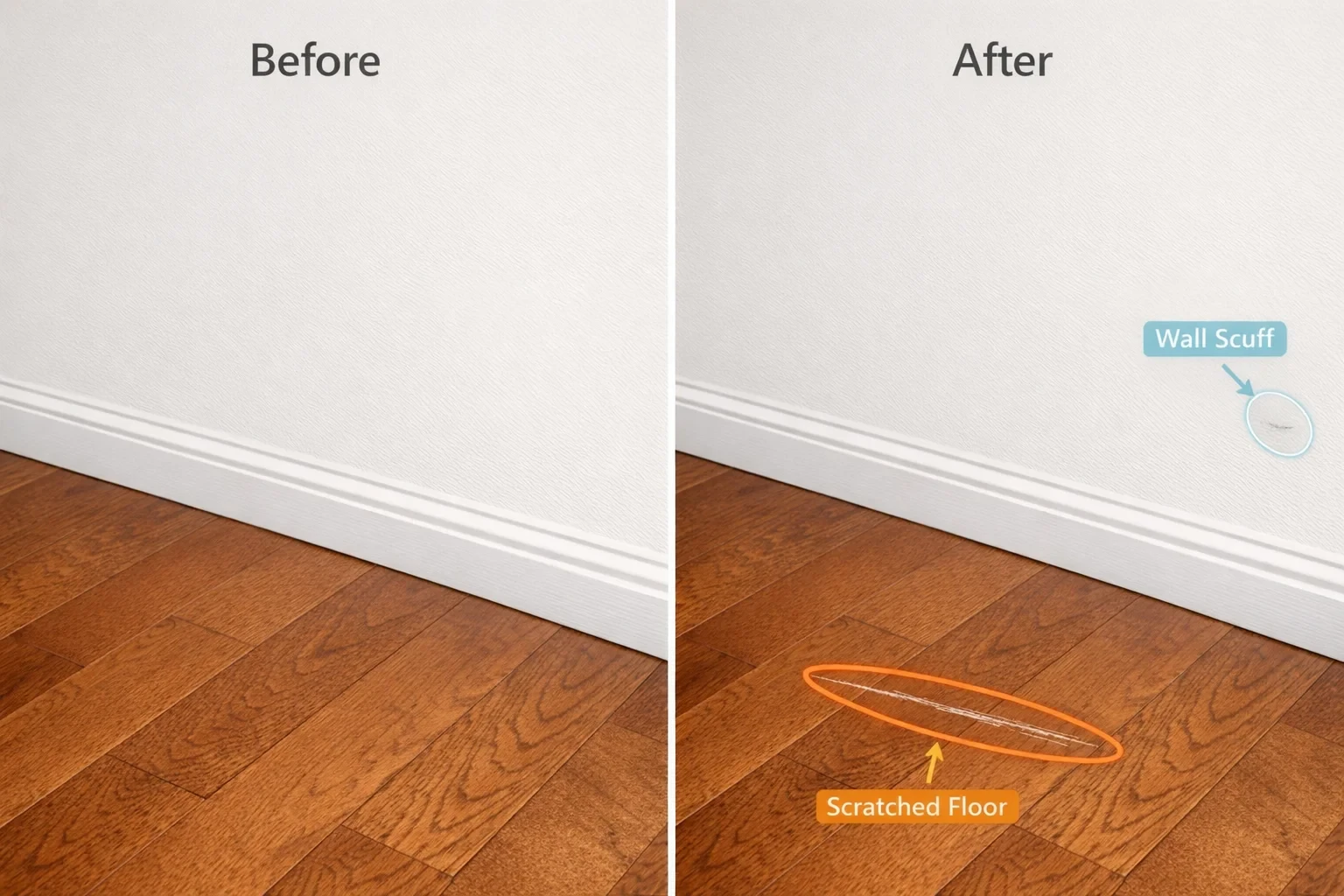
This is fundamentally harder than the alternative: comparing two images and asking "What changed?"
Change detection research in computer vision treats this as a distinct problem. Instead of training a model to recognize every possible type of damage (scratches, stains, dents, holes, burns, water damage...), you train it to spot differences between two states.
With baseline comparison:
A scratch that was there at move-in? Not flagged.
A new scratch that appeared after the last guest? Flagged.
A stain on patterned carpet? Easy to spot when you're comparing to the same carpet without the stain.
This is how RapidEye works. We create a visual baseline of each property, then compare new inspection photos against it. The question shifts from "is this damage?" to "is this new?" That's a much easier question for AI to answer accurately.
Paraspot mentions they compare "before-and-after scans" too. But here's the thing: claiming baseline comparison and publishing your actual precision/recall numbers are different things. Most vendors in this space don't share methodology.
How Confidence Thresholds Work
Every AI detection comes with a confidence score. The system might be 95% confident something is new damage, or 60% confident, or 30% confident.
The question is: what do you do with low-confidence detections?
Some systems make binary calls. Above 50% confidence? It's damage. Below? It's fine. This creates problems at the margins. A 51% confidence scratch gets treated the same as a 99% confidence hole in the wall.
At RapidEye, we take a different approach. High-confidence issues get flagged as damage. Low-confidence issues get flagged for human review. We're not pretending the AI is perfect. We're using it to surface the things worth looking at.
This matters because human inspectors miss stuff too. Studies in manufacturing inspection show Type II error rates (missed defects) around 30%. And that's with fresh inspectors. Vigilance research shows detection accuracy drops significantly after about 30 minutes of monotonous visual inspection.
You've got cleaners taking 20-100 photos per turnover, across dozens of properties per day. Nobody's reviewing all of that carefully.
Realistic Expectations
Here's the honest answer on AI damage detection accuracy:
AI catches things humans miss. Especially at scale. A system that reviews every single photo will catch the cracked tile your exhausted cleaner photographed but didn't notice. We've processed over a million photos for a single client. No human team is reviewing that volume with any consistency.
Humans catch things AI misses. Context that requires reasoning. Damage that looks like normal wear. Issues that need physical inspection to confirm.
The goal is combined performance. AI as a filter that surfaces issues worth human attention. Not AI replacing human judgment entirely.
This is especially important now that regulations are tightening. California's AB 2801 requires photo documentation at move-in and move-out starting in 2025. 40% of renters challenge their deposit deductions. Having timestamped, systematic visual evidence isn't optional anymore.
The Trust Question
So does AI damage detection work?
Yes. But not the way some vendors market it.
It's not magic that catches 100% of damage with zero false positives. It's a tool that lets you actually review the thousands of photos your team is already taking. It catches the obvious stuff automatically and flags the uncertain stuff for human review.
If a vendor won't explain how they measure accuracy, what their false positive rate looks like, or how they handle low-confidence detections, that tells you something.
We built RapidEye to be the honest option. Baseline comparison because it's fundamentally more accurate. Confidence thresholds because binary calls don't reflect reality. Human review integration because AI and humans working together beats either alone.
If you want to see how it actually performs on your properties, we can run a trial on photos you already have in Breezeway. No workflow changes needed. Just real results you can evaluate.
If you're evaluating AI damage detection tools, you have a question you might not be asking out loud: does this actually work?
Fair question. The AI hype cycle has burned a lot of people. Vendors throw around accuracy numbers like "95%+ detection" without explaining what that means or how they measured it. I've seen one competitor claim they're "powered by GPT-5.2 Vision" which... doesn't exist.
So let's talk about accuracy honestly. What the numbers actually mean, where AI excels, where it struggles, and how to set realistic expectations.
Accuracy Isn't One Number
When someone claims "95% accuracy" for damage detection, your first question should be: 95% of what?
In machine learning, there are two metrics that matter for detection tasks:
Precision: Of all the damage the system flagged, how much was actually real damage? Low precision means lots of false positives.
Recall: Of all the real damage that existed, how much did the system catch? Low recall means missed damage.
Here's the catch: these metrics trade off against each other. If you tune a system to catch every possible scratch (high recall), you'll also flag a lot of shadows and lighting changes (low precision). If you tune it to only flag obvious damage (high precision), you'll miss subtle issues (low recall).
Any vendor giving you a single accuracy number is either oversimplifying or hiding something.
Why False Positives Kill Adoption
Here's something counterintuitive: false positives are usually worse for adoption than missed damage.
Think about it. If the system flags 50 "damages" per property and 40 of them are just lighting changes or normal wear, what happens? Your team stops trusting it. They start ignoring alerts. Classic boy-who-cried-wolf effect.
Researchers studying image-based structural monitoring have flagged this exact problem. When actual damage is rare (which it usually is), even a good model can generate more false alarms than real catches. They call this the "base-rate bias" problem.
This is why the best AI systems don't just maximize detection. They balance precision and recall based on real-world consequences. A missed scratch on a baseboard is annoying. An inbox full of 200 false alerts per week makes the tool unusable.
What's Easier vs Harder to Detect
Not all damage is created equal from an AI perspective.
Easier to detect:
Holes in walls
Broken fixtures or appliances
Large stains on solid-colored surfaces
Missing items (when you have a baseline)
Obvious structural damage
Harder to detect:
Small scratches on hardwood floors (depends heavily on lighting)
Stains on patterned carpet or textured surfaces
Subtle discoloration
Damage that looks similar to normal wear
Issues partially hidden by furniture placement
The difficulty often comes down to context. A dark spot on white tile is obvious. The same spot on granite countertops might be part of the pattern. AI needs to learn what "normal" looks like for each specific surface and material.
Why Baseline Comparison Changes Everything
Most damage detection approaches try to identify damage from a single image. The AI looks at a photo and asks: "Is there damage here?"
This is fundamentally harder than the alternative: comparing two images and asking "What changed?"
Change detection research in computer vision treats this as a distinct problem. Instead of training a model to recognize every possible type of damage (scratches, stains, dents, holes, burns, water damage...), you train it to spot differences between two states.
With baseline comparison:
A scratch that was there at move-in? Not flagged.
A new scratch that appeared after the last guest? Flagged.
A stain on patterned carpet? Easy to spot when you're comparing to the same carpet without the stain.
This is how RapidEye works. We create a visual baseline of each property, then compare new inspection photos against it. The question shifts from "is this damage?" to "is this new?" That's a much easier question for AI to answer accurately.
Paraspot mentions they compare "before-and-after scans" too. But here's the thing: claiming baseline comparison and publishing your actual precision/recall numbers are different things. Most vendors in this space don't share methodology.
How Confidence Thresholds Work
Every AI detection comes with a confidence score. The system might be 95% confident something is new damage, or 60% confident, or 30% confident.
The question is: what do you do with low-confidence detections?
Some systems make binary calls. Above 50% confidence? It's damage. Below? It's fine. This creates problems at the margins. A 51% confidence scratch gets treated the same as a 99% confidence hole in the wall.
At RapidEye, we take a different approach. High-confidence issues get flagged as damage. Low-confidence issues get flagged for human review. We're not pretending the AI is perfect. We're using it to surface the things worth looking at.
This matters because human inspectors miss stuff too. Studies in manufacturing inspection show Type II error rates (missed defects) around 30%. And that's with fresh inspectors. Vigilance research shows detection accuracy drops significantly after about 30 minutes of monotonous visual inspection.
You've got cleaners taking 20-100 photos per turnover, across dozens of properties per day. Nobody's reviewing all of that carefully.
Realistic Expectations
Here's the honest answer on AI damage detection accuracy:
AI catches things humans miss. Especially at scale. A system that reviews every single photo will catch the cracked tile your exhausted cleaner photographed but didn't notice. We've processed over a million photos for a single client. No human team is reviewing that volume with any consistency.
Humans catch things AI misses. Context that requires reasoning. Damage that looks like normal wear. Issues that need physical inspection to confirm.
The goal is combined performance. AI as a filter that surfaces issues worth human attention. Not AI replacing human judgment entirely.
This is especially important now that regulations are tightening. California's AB 2801 requires photo documentation at move-in and move-out starting in 2025. 40% of renters challenge their deposit deductions. Having timestamped, systematic visual evidence isn't optional anymore.
The Trust Question
So does AI damage detection work?
Yes. But not the way some vendors market it.
It's not magic that catches 100% of damage with zero false positives. It's a tool that lets you actually review the thousands of photos your team is already taking. It catches the obvious stuff automatically and flags the uncertain stuff for human review.
If a vendor won't explain how they measure accuracy, what their false positive rate looks like, or how they handle low-confidence detections, that tells you something.
We built RapidEye to be the honest option. Baseline comparison because it's fundamentally more accurate. Confidence thresholds because binary calls don't reflect reality. Human review integration because AI and humans working together beats either alone.
If you want to see how it actually performs on your properties, we can run a trial on photos you already have in Breezeway. No workflow changes needed. Just real results you can evaluate.